YouTube is one of the most popular platforms for uploading videos, songs, music, gaming videos, and YouTube Shorts. Many people create music channels to share their favorite songs and grow their audience.
However, beginners often face a common problem called copyright.
Sometimes, you upload a video with music, and YouTube shows a copyright notice. Your video may be blocked, the earnings may go to the copyright owner, or you may receive a copyright strike.
So, how can you upload music on YouTube without copyright problems?
The answer is simple: use your own original music, get permission from the copyright owner, or choose music with a suitable license.
In this article, you will learn how copyright works, where to find free music, how to upload music on YouTube, and how to protect your channel from copyright problems.
1. What Is Copyright on YouTube?
Copyright is a legal right that protects original creative work. Music, songs, videos, movies, photographs, and sound recordings can all be protected by copyright.
For example, imagine that a singer releases a new song. The song may contain different copyrighted elements, including the lyrics, musical composition, and sound recording.
You cannot automatically use that song in your own YouTube video just because it is available online.
Here are some examples of content that may be copyrighted:
- Bollywood songs and movie music.
- Songs from independent singers.
- Background music from movies and television shows.
- Music downloaded from another YouTube channel.
- Remixes, mashups, and slowed or reverb versions of songs.
- Music from streaming platforms.
If you want to use copyrighted music, you may need permission or a license from the relevant rights holders.
Important: Giving credit to the singer or writing “No copyright intended” in your description does not automatically give you permission to use the song.
2. What Is a Copyright Claim on YouTube?
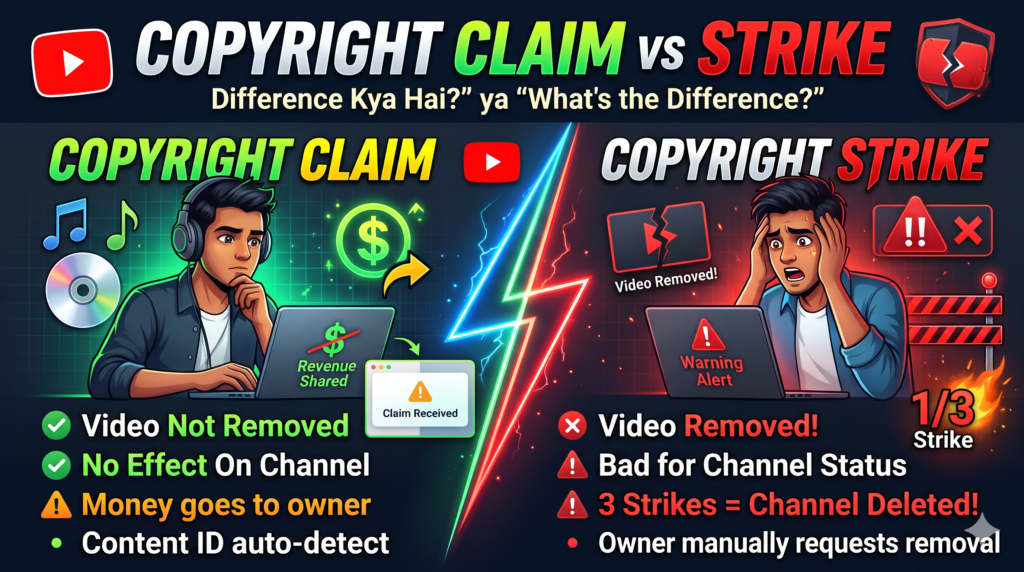
A Copyright Claim is a notice that your video contains content claimed by a copyright owner.
One common type is a Content ID claim. YouTube’s Content ID system automatically scans uploaded videos and compares them with reference content provided by eligible copyright owners.
For example, suppose you upload a video containing a popular Bollywood song. YouTube may recognize the music and generate a Content ID claim.
The copyright owner can choose a policy for the claimed content.
What happens when you receive a Copyright Claim?
Depending on the owner’s policy and the situation:
- Your video may remain available on YouTube.
- Advertising revenue may go to the copyright owner.
- The video may be blocked in certain countries or worldwide.
- The owner may track information about the video’s views.
Not every claim has the same effect. You should always check the details of the specific claim in YouTube Studio.
Does a Copyright Claim damage your channel?
A Content ID claim does not automatically give your channel a copyright strike.
However, the claim may affect your video’s availability or monetization. Repeatedly using music without permission can also create further problems.
How to check a Copyright Claim
Follow these steps:
- Open YouTube Studio.
- Select Content from the left-side menu.
- Find the video showing a copyright restriction.
- Look at the Restrictions column.
- Click the copyright notice or select See Details.
- Review the claimed content, claimant information, and available options.
If you have a valid license, you can review the claim and consider disputing it with appropriate evidence.
Do not dispute a claim unless you have a valid reason.
3. What Is a Copyright Strike on YouTube?
A Copyright Strike is a more serious copyright action.
It generally occurs when a copyright owner submits a valid copyright removal request and YouTube removes the video in response.
For example, you upload an entire song owned by another music company without permission. The owner may request its removal, and YouTube may issue a copyright strike.
What happens after a Copyright Strike?
A copyright strike can have serious consequences:
- YouTube removes the affected video.
- You may need to complete Copyright School.
- Certain channel features or activities may be affected.
- Three active copyright strikes can make your channel eligible for termination.
A strike is different from a Content ID claim, and the rules for resolving the two are not the same.
Does one Copyright Strike delete your channel?
A single strike does not automatically mean that your entire channel will be deleted.
However, you should take it seriously and review the information provided by YouTube.
If you receive a strike, possible resolution options may include asking the claimant to retract the removal request or submitting a valid counter notification when you have a good-faith legal basis.
Simply deleting the video after a strike has been issued generally does not remove the strike.
4. Copyright Claim vs. Copyright Strike: Main Differences
Understanding the difference between these two issues can help you make better decisions for your channel.
| Feature | Copyright Claim | Copyright Strike |
|---|---|---|
| What is it? | A claim against content in your video | A copyright enforcement action following a removal request |
| Common cause | Music detected by Content ID | A valid copyright removal request |
| Is the video removed? | Not necessarily | Generally, yes |
| Can monetization be affected? | Yes | The video is removed, so it cannot earn from views on YouTube |
| Is the whole channel immediately deleted? | No | Not usually after one strike |
| Can it be resolved? | Sometimes, through licensing, editing, or a valid dispute | Possible routes include retraction or a valid counter notification |
| Is it serious? | It depends on the restrictions | More serious for channel standing |
Remember: A Copyright Claim is not the same as a Copyright Strike. Always check the exact notice in YouTube Studio before taking action.
5. Best Websites to Find Music for YouTube
If you want to upload music without unnecessary copyright problems, start with music libraries that provide clear usage terms.
1. YouTube Audio Library
YouTube Audio Library is a useful starting point for new creators. It offers music tracks and sound effects that YouTube identifies as copyright-safe for use on the platform.
You can search for different types of music, such as relaxing music, background music, cinematic music, and gaming music.
Website: https://www.youtube.com/audiolibrary
How to use it:
- Open YouTube Studio.
- Select Audio Library.
- Search for the type of music you need.
- Listen to the available tracks.
- Check whether attribution is required.
- Download the selected track.
- Add it to your video.
If attribution is required, copy the supplied credit text into your video description.
2. Pixabay Music
Pixabay offers music and sound effects that can be useful for videos, presentations, and other creative projects.
Website: https://pixabay.com/music/
Before downloading a track, read its current license terms and check whether your intended use is permitted.
Do not assume that every track is free for every purpose or that a copyright claim can never occur.
3. Mixkit
Mixkit offers music for different types of creative projects, including video backgrounds and online content.
Website: https://mixkit.co/free-stock-music/
Choose music that matches your video and review the applicable license before publishing.
Which music source should beginners use?
For a beginner who mainly uploads to YouTube, the YouTube Audio Library is a sensible first choice because its music is provided specifically for creators using YouTube.
However, always follow any attribution instructions and keep a record of the track you used.
6. How to Download Music from YouTube Audio Library
Here is the complete process.
Step 1: Open YouTube Studio
Visit https://studio.youtube.com/ and sign in to your YouTube account.
Step 2: Open Audio Library
Find Audio Library in the left-side menu.
Step 3: Search for music
Use the search bar or filters to find music that matches your video.
For example, you can search for relaxing music, cinematic music, or background music.
Step 4: Listen before downloading
Preview the track and make sure it suits your video.
Step 5: Check the license and attribution
Some tracks require credit in the description. Others do not require attribution.
Read the information displayed for the track.
Step 6: Download the music
Click the download option for the selected track.
Step 7: Keep the details
Save the track name and its license or attribution information. This can help you if a question about its use arises later.
7. How to Upload Music to YouTube Step by Step
After preparing your audio, you need to create a video file. YouTube generally requires audio to be included in a video for a standard video upload.
Step 1: Prepare your music
Use music you created yourself or music that you have permission to use.
Step 2: Create a video
You can use original footage, an animation, a visualizer, or suitable images that you have the right to use.
Step 3: Edit your video
Open a video editing application and import your video or images.
Add the music track and adjust its volume and timing.
Step 4: Export the video
Export the finished project in a supported video format, such as MP4.
Step 5: Open YouTube
Sign in to your YouTube account.
Step 6: Click Create
Select Create and then Upload Videos.
Step 7: Select your video
Choose the video file you exported.
Step 8: Add video details
Write a clear title, description, and other relevant information. Add a thumbnail that you have permission to use.
Step 9: Complete the settings
Choose the appropriate audience setting and visibility for your video.
Step 10: Check for copyright restrictions
Review the Checks section when it is available. If YouTube identifies a copyright issue, read the details and decide what action is appropriate.
Step 11: Publish your video
Once you have reviewed the settings and any copyright notices, you can publish your video.
Important: Passing YouTube’s copyright checks does not guarantee that a video will never receive a later claim or removal request.
8. Can You Upload Bollywood Songs Without Copyright?
Many people want to upload Bollywood songs, romantic songs, mashups, or slowed and reverb music to their channels.
However, popular songs are often protected by copyright.
If you upload a full Bollywood song without the necessary rights, your video may receive a claim or be removed.
Changing the song’s speed, pitch, or background does not automatically make it copyright-free.
What if you want to upload a romantic song?
Consider these options:
- Get permission or a suitable license from the relevant rights holders.
- Use music that is specifically licensed for your intended use.
- Create your own original romantic music.
- Use a track from a suitable music library and follow its license terms.
What about mashups and remixes?
A mashup or remix may use multiple copyrighted songs. You may need permission for the musical compositions and recordings involved.
Adding your own editing or combining several songs does not automatically give you the necessary rights.
9. How to Use Music in YouTube Shorts
YouTube Shorts creators should also understand copyright rules.
If you create a Short using music, you should consider how you obtained that music and what permissions apply.
A safer way to add music to Shorts
- Open the YouTube app.
- Start creating a Short.
- Use the music or sound options available within the Shorts creation tools.
- Check which tracks are available for your intended use.
- Create your Short using the available tools and applicable rules.
- Review any restrictions shown by YouTube.
Music available through YouTube’s Shorts tools may have specific usage conditions. Do not assume that you can download that music and reuse it freely in a video uploaded elsewhere.
If you edit a Short outside YouTube, use original music or music licensed for that use.
10. Can You Earn Money from Copyright-Free Music?
Yes, you may be able to earn money from videos containing properly licensed music.
However, using copyright-free music does not automatically make a channel eligible for monetization.
Your channel must also comply with YouTube’s monetization requirements and policies.
For example, a channel that repeatedly uploads other people’s music with only a static image may face reused-content or other monetization issues.
To improve your chances of building a sustainable channel:
- Create original videos.
- Use music with appropriate commercial-use rights.
- Add your own creative contribution.
- Make sure you follow YouTube’s monetization policies.
- Keep proof of licenses and permissions.
Before using a track in a monetized video, confirm that its license allows commercial use.
11. Common Copyright Mistakes You Should Avoid
Many beginners make avoidable mistakes when uploading music.
Mistake 1: Giving credit is enough
Writing the singer’s name does not automatically grant permission.
Mistake 2: Adding a copyright disclaimer
Writing “No copyright intended” does not protect you from copyright claims.
Mistake 3: Changing the song’s speed
Slow, reverb, pitch-shifted, and sped-up versions may still contain copyrighted material.
Mistake 4: Using music from another YouTube channel
A track being available on YouTube does not mean you can download and reuse it.
Mistake 5: Assuming every free track is safe
Free downloads can have different license conditions. Read the applicable terms.
Mistake 6: Ignoring a copyright notice
Always review the claim or strike and understand the options before taking action.
Mistake 7: Assuming a short clip is always allowed
There is no universal number of seconds that automatically makes copyrighted music safe to use.
12. What Should You Do If You Receive a Copyright Claim?
If your video receives a Content ID claim, follow these steps.
- Open YouTube Studio.
- Go to Content.
- Find the affected video.
- Open its copyright details.
- Check which content was claimed and who made the claim.
- Review the options available for that claim.
Depending on the situation, you may be able to remove or replace the claimed music, mute the claimed section, obtain a license, or submit a dispute if you have a valid basis.
Only dispute a claim when you have a legitimate reason, such as owning the rights, having the necessary license, or having another legally valid basis.
Do not submit a dispute simply because you want to keep the music in your video.
13. What Should You Do If You Receive a Copyright Strike?
A strike requires careful attention because the video may already have been removed.
First, read the notification from YouTube and check the details in YouTube Studio.
Possible resolution options include:
- Contacting the claimant to request a retraction.
- Completing Copyright School if required.
- Submitting a counter notification if you have a good-faith legal basis.
A counter notification is a formal legal process, not simply another type of dispute. Make sure you understand its requirements before submitting one.
Deleting the removed video generally does not clear an existing strike.
YouTube’s official guidance explains the current process for handling copyright strikes.
14. Frequently Asked Questions (FAQs)
Q1. Can I upload music to YouTube without copyright problems?
Yes, if you use music you created yourself, music you have permission to use, or music covered by a suitable license. No method can guarantee that a claim will never occur.
Q2. Is YouTube Audio Library free?
YouTube Audio Library provides tracks and sound effects for creators. Check the individual track’s attribution requirements and usage information.
Q3. Can I use free music in monetized videos?
Yes, when the applicable license allows commercial use and your video and channel meet YouTube’s monetization policies.
Q4. Can I upload a song after giving credit to the singer?
Credit alone does not provide copyright permission. You may still need a license.
Q5. Can I upload slowed and reverb songs?
Changing the speed or adding effects does not automatically remove copyright protection. You need the appropriate rights or permission.
Q6. Does a Copyright Claim mean my channel will be deleted?
No. A Content ID claim does not automatically mean your channel will be deleted. Check the claim details to understand its effect.
Q7. Can one Copyright Strike delete my channel?
One strike does not automatically terminate a channel. However, three active copyright strikes can put the channel at risk of termination.
Q8. Can I upload music with only one photo?
Technically, you can create a video using a still image and audio. However, you must have the rights to both, and repetitive or minimally transformed content may create monetization problems.
Q9. Is music from Pixabay always copyright-free?
Do not assume every track is free for every use. Check the applicable license and any relevant restrictions before using a track.
Q10. How can I check a video’s copyright status before publishing?
Use the Checks section during the upload process when available. You can also review restrictions in YouTube Studio. These checks do not guarantee that future claims will never occur.
Official Resources
You can visit these official pages to learn more:
- YouTube Audio Library: https://www.youtube.com/audiolibrary
- Understand Content ID Claims: https://support.google.com/youtube/answer/6013276
- Understand Copyright Strikes: https://support.google.com/youtube/answer/2814000
- YouTube Copyright Help: https://support.google.com/youtube/topic/2676339